A CLAUDE.md file is a markdown configuration file placed at your project root that tells Claude Code how to behave — which commands to run, which conventions to follow, and which architectural boundaries to respect. To write an effective CLAUDE.md, include only what Claude cannot infer from the code: build commands, style rules that differ from defaults, architectural boundaries, and verification steps. Keep it under 100 lines, version it with git, and update it every time Claude makes a preventable mistake.
This guide covers CLAUDE.md configuration only — what to include and omit, how the six-level hierarchy works, and the seven common mistakes that silently reduce Claude’s effectiveness. This guide does not cover Claude Code skills, MCP servers, or model selection.
Key Takeaways:
- CLAUDE.md is a project configuration file for Claude Code’s behavior — not documentation, not a README
- Keep your CLAUDE.md under 100 lines; use
@imports and.claude/rules/for the rest - Include only what Claude cannot infer from the code itself — build commands, architectural boundaries, verification steps
- Treat it like code: version it with git, review it in PRs, and prune it regularly
- A well-structured CLAUDE.md typically covers 5 sections (as needed): commands, code conventions, architecture, testing, and verification
What Is CLAUDE.md?
CLAUDE.md is a markdown configuration file that Claude Code reads at the start of every session. It contains project-specific instructions that Claude follows across all interactions. Think of it as a .editorconfig or .eslintrc for AI behavior.
The key distinction: CLAUDE.md is instructions you write for Claude. This is different from auto memory, which contains notes Claude writes for itself. Both are loaded into context at session start, but you control CLAUDE.md directly.
According to Anthropic’s documentation, Claude Code loads CLAUDE.md into the system prompt before processing any user input. This means instructions in CLAUDE.md take effect before your first message.
The CLAUDE.md Hierarchy: Six Levels of Configuration
Claude Code reads up to six layers of configuration, from the broadest to the most specific, rather than a single CLAUDE.md file. This layered approach mirrors how tools like Git resolve configuration — global settings provide defaults, while local settings override them. Understanding this hierarchy is essential for teams, because it determines which instructions take precedence.
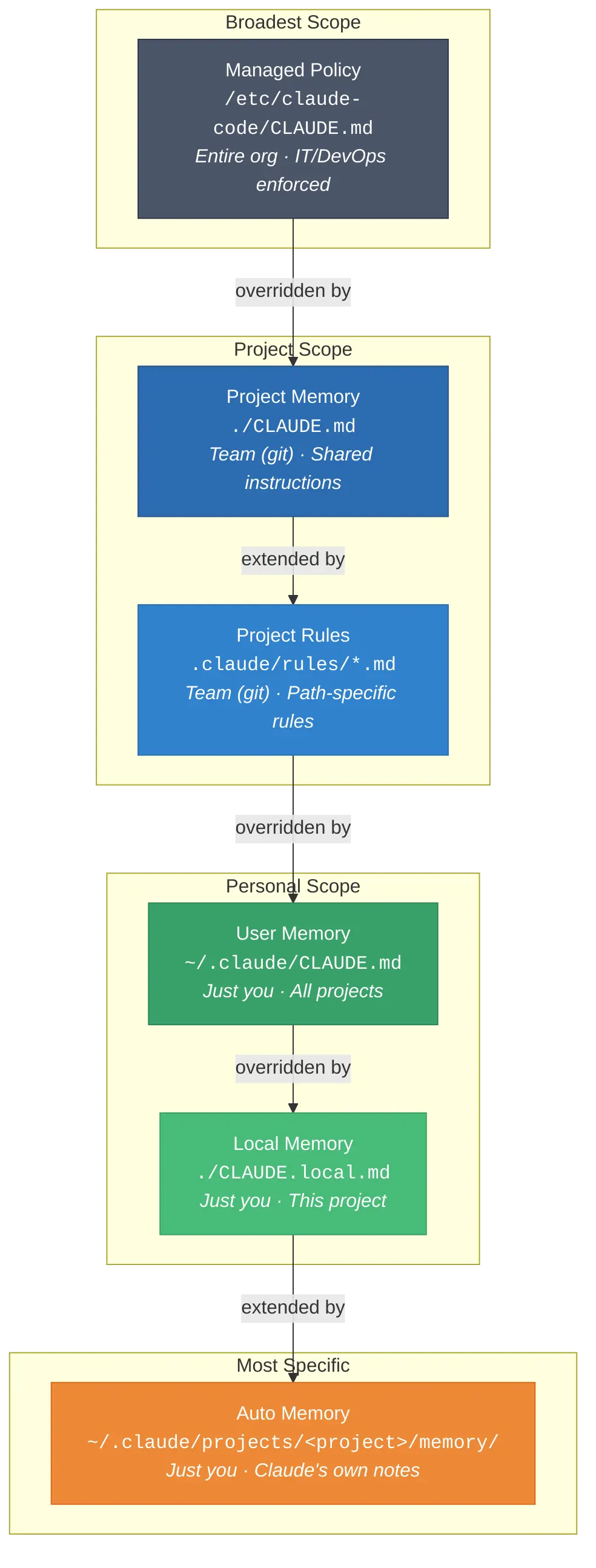
| Level | Location | Shared With | Purpose |
|---|---|---|---|
| Managed Policy | /etc/claude-code/CLAUDE.md (Linux) | Entire org | IT/DevOps enforced rules |
| Project Memory | ./CLAUDE.md or ./.claude/CLAUDE.md | Team (git) | Shared project instructions |
| Project Rules | ./.claude/rules/*.md | Team (git) | Modular, topic-specific rules |
| User Memory | ~/.claude/CLAUDE.md | Just you | Personal prefs, all projects |
| Local Memory | ./CLAUDE.local.md | Just you | Personal prefs, this project |
| Auto Memory | ~/.claude/projects/<project>/memory/ | Just you | Claude’s own notes |
More specific configuration levels override broader ones. For example, if the user-level file specifies “use tabs” but the project file specifies “use 2-space indentation,” Claude will follow the project-level instruction.
A few behaviors worth knowing:
- Parent directories load at launch. If you run Claude Code in foo/bar/, both foo/CLAUDE.md and foo/bar/CLAUDE.md are read.
- CLAUDE.md files in child directories load only when Claude accesses files in those directories. This approach keeps the context concise.
- CLAUDE.local.md should be gitignored. Use it for personal sandbox URLs, preferred test data, or any information you do not want to commit.
For most developers, the project-level CLAUDE.md is sufficient. In a 2025 Anthropic engineering blog post, the Claude Code team recommends starting with a single project-level file and expanding to .claude/rules/ only when the file exceeds 100 lines or when path-specific rules become necessary.
What to Include (and What to Leave Out)
Many developers make mistakes by writing too little, which makes the file ineffective, or too much, which causes Claude to overlook important instructions. Research on prompt engineering for large language models shows that concise, structured instructions consistently outperform verbose, unstructured ones — and this principle applies directly to CLAUDE.md.
Include
Include commands that Claude cannot infer:
# Commands

- Build: `npm run build`
- Test single file: `npx vitest run path/to/test.ts`
- Lint: `npm run lint -- --fix`
- Typecheck: `npx tsc --noEmit`
Include style rules that differ from defaults:
# Code Style

- Use ES modules (import/export), not CommonJS (require)
- Prefer named exports over default exports
- Use Zod for all API input validation
Document decisions that can’t be inferred from the code:
# Architecture

- API routes live in src/app/api/ (Next.js App Router)
- All database access goes through src/lib/db/ — never import Prisma directly in routes
- Feature flags are managed in src/config/flags.ts
Mandatory verification commands:
# Verification

- After code changes, run: `npx tsc --noEmit && npx vitest run`
- Before submitting: verify lint passes with `npm run lint`
What to Leave Out of CLAUDE.md
- Omit information that Claude can determine from the code. For example, if your project uses TypeScript, Claude will recognize this automatically.
- Do not include standard language conventions. Claude already recognizes that Go uses gofmt and Python uses snake_case.
- Avoid including lengthy API documentation. Instead, provide links to documentation, such as: See @docs/api-reference.md for the full API specification.
- Exclude frequently changing information. Since CLAUDE.md loads every session, volatile data can result in outdated context.
Self-evident practices. “Write clean code” and “follow best practices” are noise.
For each line, ask: Would removing this cause Claude to make mistakes? If not, remove it.
The CLAUDE.md litmus test: Every line in your CLAUDE.md should prevent a specific, repeatable mistake. If you cannot point to a time Claude got something wrong without that instruction, the line is noise.
Anatomy of a Great CLAUDE.md
Here’s an example of a real-world CLAUDE.md file.
# Project: Acme Dashboard

Next.js 15 App Router + TypeScript + Prisma + PostgreSQL.
Monorepo managed with Turborepo. This package is `apps/dashboard`.

# Commands

- Dev server: `turbo dev --filter=dashboard`
- Build: `turbo build --filter=dashboard`
- Test single file: `npx vitest run path/to/file.test.ts`
- Test all: `turbo test --filter=dashboard`
- Lint + fix: `npm run lint -- --fix`
- Typecheck: `npx tsc --noEmit`
- DB migrate: `npx prisma migrate dev`
- DB generate: `npx prisma generate`

# Code Conventions

- Use ES modules, not CommonJS
- Named exports only (no default exports)
- All API inputs validated with Zod schemas in src/lib/validators/
- Error responses follow the format in src/lib/errors.ts
- Prefer server components; only use 'use client' when state/interactivity is required

# Architecture

- Route handlers: src/app/api/
- DB access: src/lib/db/ only — never import @prisma/client directly in routes
- Auth: NextAuth.js v5. Session checks via src/lib/auth.ts
- Feature flags: src/config/flags.ts. Check before using any gated feature.

# Testing

- Use Vitest + React Testing Library
- Test files go next to source: `component.tsx` → `component.test.tsx`
- Mock external APIs in tests using msw (already configured in src/test/setup.ts)
- Prefer running single tests, not the full suite, for speed

# Git Workflow

- Branch naming: feature/TICKET-123-short-description
- Commit messages: conventional commits (feat:, fix:, chore:)
- Always run typecheck and lint before committing
- PR description must include "What" and "Why" sections

# Verification

After making changes, always run:

1. `npx tsc --noEmit` (typecheck)
2. `npx vitest run` (tests for changed files)
3. `npm run lint` (lint check)

# Common Gotchas

- Prisma client must be regenerated after schema changes (`npx prisma generate`)
- The `NEXT_PUBLIC_` prefix is required for client-side env vars
- Server actions in src/app/actions/ must use 'use server' directive
This example is 58 lines — well under the 100-line target — and covers the five core sections: commands, conventions, architecture, testing, and verification. Avoid generic advice, information that can become outdated, or information inferred from the codebase.
The /init Command: Your Starting Point
Running /init will auto-generate a CLAUDE.md file by performing an analysis of your project. This provides a starting
point, but does not capture:
- Workflow conventions (branch naming, commit rules, etc.)
- Architectural rules
- Verification steps
- Team-specific guidelines
Run /init, then spend 15 minutes adding project-specific knowledge. Tell Claude to update its own CLAUDE.md file whenever it makes a mistake.
Advanced Patterns
@imports: Keep it Clean
CLAUDE.md supports importing other files:
# Architecture

See @docs/architecture.md for the full system design.
See @docs/api-conventions.md for API response formats.
Relative paths resolve from the importing file, not the working directory. Imports can chain up to 5 levels deep. First-time imports trigger an approval dialog.
.claude/rules/: Path-Specific Rules
For larger projects, split rules into .claude/rules/ files:
.claude/
  rules/
    api.md          # Rules for API code
    frontend.md     # Rules for frontend code
    testing.md      # Testing conventions
Scope rules to paths with frontmatter:
---
paths:
  - "src/app/api/**/*.ts"
---

# API Rules

- All endpoints must validate input with Zod
- Return errors using the standard format from src/lib/errors.ts
- Include rate limiting for public endpoints
Why Size Matters: CLAUDE.md and the Context Window
Each line in CLAUDE.md uses space in Claude’s 200,000-token context window, which also stores conversation history, file contents, and tool results. According to research on lost-in-the-middle effects in long-context models (Liu et al., 2023), LLMs are more likely to miss instructions buried in the center of long contexts. A bloated CLAUDE.md pushes critical rules into this “attention dead zone.”
Claude Code triggers auto-compaction at approximately 83.5% of the context window. Once compaction starts, earlier instructions — including parts of your CLAUDE.md — may be summarized or dropped entirely.
Aim for under 100 lines for most projects. If additional detail is needed, use @ imports and .claude/rules/ to keep the core file concise. In practice, I have found that files between 40-80 lines hit the sweet spot: enough detail to prevent common mistakes, but short enough that Claude follows every instruction reliably.
Seven Common Mistakes
| # | Mistake | Why It Hurts | Fix |
|---|---|---|---|
| 1 | Overstuffing (300+ lines) | Claude loses track of important rules. If everything is important, nothing is. | Keep under 100 lines; use @ imports for the rest |
| 2 | Pasting code snippets | Snippets become outdated after refactoring | Reference files with @ instead |
| 3 | Using it as a linter | Duplicates ESLint/Prettier; wastes context tokens | Use static analysis tools; use hooks for enforcement |
| 4 | Relying solely on /init | Auto-generated file only captures obvious rules | Spend 15 minutes adding project-specific knowledge |
| 5 | Adding task-specific rules | Migration rules distract when writing CSS | Move domain rules to .claude/rules/ with path scoping |
| 6 | Writing negative instructions | “Never use –force” can confuse the model | Use positive framing: “Prefer git push over git push –force” |
| 7 | Not pruning over time | Models improve; old rules become unnecessary noise | Audit monthly; the Claude Code team trims theirs multiple times per week |
CLAUDE.md Best Practices: Treat It Like Code
The most important CLAUDE.md best practices come down to treating the file as a living, versioned document rather than a one-time setup. This mirrors the infrastructure-as-code philosophy: declarative, version-controlled, and continuously refined.
- Update CLAUDE.md after each correction. If you repeatedly provide the same instruction to Claude, include it in the file.
- Review CLAUDE.md during pull requests. The Claude Code team uses @.claude references in GitHub PRs to propose updates. If a pull request reveals a missing rule, add it.
- Version it with git. Commit your CLAUDE.md. Let your team contribute. The file compounds in value as more developers add their hard-won lessons.
- Audit periodically. Once a month, read through your CLAUDE.md and ask: is Claude still making the mistakes these rules prevent? If not, cut the rule.
- Emphasize critical rules. If a rule is frequently violated, prefix it with “IMPORTANT:” as this measurably improves adherence.
Quick-Start Template
Here’s a minimal template to get started. Copy it, fill in the brackets, and delete what doesn’t apply:
# [Project Name]

[One-line description. Tech stack.]

# Commands

- Build: `[build command]`
- Test: `[test single file command]`
- Lint: `[lint command]`
- Typecheck: `[typecheck command]`

# Code Conventions

- [Convention that differs from the default]
- [Convention that differs from the default]

# Architecture

- [Key architectural boundary or rule]
- [Where important things live]

# Verification

After changes, run:

1. `[typecheck command]`
2. `[test command]`
3. `[lint command]`
Expand it based on the actual mistakes Claude makes in your project, rather than anticipated issues.
Frequently Asked Questions
What is CLAUDE.md?
CLAUDE.md is a markdown configuration file that Claude Code reads at the start of every session. It contains persistent, project-specific instructions — build commands, code conventions, architectural rules, and verification steps — that shape how Claude behaves in your project.
How long should CLAUDE.md be?
Aim for under 100 lines for most projects. Files exceeding 300 lines cause Claude to lose track of important rules due to context window pressure. Use @ imports and .claude/rules/ files to offload detailed or path-specific instructions.
Can I have multiple CLAUDE.md files?
Yes. Claude Code reads up to six levels of configuration: managed policy, project memory, project rules, user memory, local memory, and auto memory. It also reads CLAUDE.md files from parent directories at launch and from child directories on demand. More specific files override broader ones.
Does CLAUDE.md support imports?
Yes. Use @ references like See @docs/architecture.md to import other files. Relative paths resolve from the importing file. Imports chain up to 5 levels deep, and first-time imports trigger an approval dialog.
What is the difference between CLAUDE.md and auto memory?
CLAUDE.md is written by you and contains intentional project instructions. Auto memory is written by Claude itself — notes it saves to ~/.claude/projects/<project>/memory/ during sessions. Both are loaded into context at session start, but you directly control only CLAUDE.md.
What should I put in CLAUDE.md?
Include four categories of information: (1) build, test, and lint commands, (2) code style rules that differ from language defaults, (3) architectural boundaries Claude cannot infer from code, and (4) verification steps Claude should run after changes. Omit anything Claude can determine from the codebase itself, such as the programming language or standard conventions.
How is CLAUDE.md different from a system prompt?
CLAUDE.md functions like a persistent system prompt that is automatically loaded at session start, but it lives in your repository as a file you version with git. Unlike one-off system prompts, it persists across sessions, is shared with your team through source control, and supports a six-level hierarchy that allows org-wide, project-level, and personal configuration.
Does CLAUDE.md work with other AI coding tools?
CLAUDE.md is specific to Claude Code, Anthropic’s CLI-based coding agent. Other tools have similar concepts — Cursor uses .cursorrules, GitHub Copilot uses custom instructions — but the file formats and loading behaviors differ. The principles in this guide (concise instructions, architectural boundaries, verification steps) apply across tools.
Start Writing Your CLAUDE.md Today
CLAUDE.md is the highest-leverage file in any Claude Code project. A concise, well-structured file — typically 40-80 lines — consistently outperforms hours of manual prompting because it provides persistent instructions that eliminate the need to repeat yourself.
Here’s how to get started in the next 15 minutes:
- Run
/initin your project to generate a baseline CLAUDE.md - Add your build, test, and lint commands
- Document 3-5 architectural rules that Claude cannot infer from the code
- Add a verification section so Claude always checks its own work
- Commit the file, and refine it every time Claude makes a preventable mistake
Bottom Line: Getting the most poductive results from AI coding agents is a balance between providing correct context and avoiding too much information. CLAUDE.md is the starting point for that concise configuration language. For rules that must never be violated, pair your CLAUDE.md with Claude Code hooks — deterministic enforcement that fires every time, with no exceptions.